

Contents
- 1 Introduction
- 2 Successful vs Risky Website Redesign
- 3 Why can a website redesign hurt SEO rankings?
- 4 What should you audit before starting a website redesign?
- 5 How do you map URLs and redirects during a redesign?
- 6 What technical SEO settings must be preserved during a redesign?
- 7 How do you protect existing content and keyword rankings?
- 8 How should performance and Core Web Vitals be optimized?
- 9 What should you monitor immediately after launch?
- 10 Implementation Checklist
- 11 Conclusion
Key Takeaways
- A website redesign can unintentionally destroy SEO rankings if redirects, URLs, and metadata are not handled correctly.
- A structured website redesign SEO checklist prevents traffic loss and preserves keyword visibility.
- 301 redirects protect existing backlinks and transfer link equity to the new site structure.
- Technical elements like XML sitemaps, canonical tags, and robots.txt must be verified before launch.
- Monitoring Google Search Console immediately after launch helps detect indexing and crawl issues.
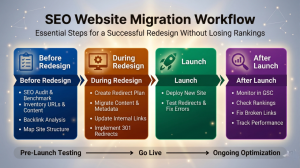
Introduction
A website redesign checklist to protect SEO is essential because redesigns often cause major ranking losses if handled incorrectly. When URL structures change, redirects fail, or metadata disappears, search engines like Google may treat the site as completely new. That can lead to traffic drops, broken backlinks, and lost keyword positions.
The good news is that most SEO damage during redesigns is preventable with proper planning. By auditing your existing site, mapping redirects, preserving metadata, and monitoring indexing after launch, businesses can redesign without sacrificing organic visibility. This guide provides a practical website redesign SEO checklist to maintain rankings and protect search traffic.
Successful vs Risky Website Redesign
The table below highlights the difference between an SEO-safe redesign and a redesign that risks damaging search visibility.
| Factor | SEO-Safe Redesign | SEO-Damaging Redesign |
|---|---|---|
| URL Structure | 301 redirects mapped for every changed URL | URLs changed without redirects causing broken links |
| Content | Existing high-performing pages preserved and optimized | Important pages removed or heavily rewritten without SEO review |
| Metadata | Page titles, meta descriptions, and headers migrated correctly | Metadata lost or replaced during redesign |
| Images and Media | Image filenames preserved, alt text added, and images optimized | Images uploaded without alt text or compression |
| Internal Links | Internal linking structure updated and tested | Broken internal links and incorrect navigation paths |
| Technical SEO | XML sitemap, robots.txt, and canonical tags configured correctly | Crawling accidentally blocked or duplicate content created |
| Structured Data | Schema.org markup migrated and validated after launch | Structured data removed or broken during redesign |
| Performance and Speed | Images compressed, caching enabled, and Core Web Vitals optimized | Large images and heavy scripts causing slow load times |
| Website Technology | CMS or framework migration planned with SEO compatibility | New platform changes URLs or removes SEO settings |
| Third-Party Scripts | Analytics, tag manager, and tracking scripts verified | Tracking scripts missing or incorrectly implemented |
| Monitoring | Google Search Console and analytics monitored after launch | No monitoring for indexing or crawl issues |
Why can a website redesign hurt SEO rankings?
A website redesign can hurt SEO rankings because search engines rely on stable URLs, internal links, and metadata to understand a website. When these elements change without proper migration steps, search engines lose signals that previously helped rank the site.
Common causes of ranking drops include:
• URL changes without redirects
• Missing page titles and meta descriptions
• Broken internal links
• Lost structured data
• Blocked crawling through robots.txt
• Slower page speed or mobile issues
For example, when a page URL changes from example.com/services to example.com/our-services without a 301 redirect, Google treats the new page as separate content. Any backlinks pointing to the old page lose their SEO value.
Remember: Most SEO losses during redesigns are caused by missing redirects or lost metadata.
What should you audit before starting a website redesign?
Before redesigning a website, you should conduct a complete SEO audit to document the current structure, rankings, and traffic sources. This audit becomes the reference point for protecting SEO performance.
Before Redesign
| SEO Tasks | Key Objective |
|---|---|
| Run a full SEO audit of the current website | Document rankings, traffic sources, and existing SEO assets |
| Export all existing URLs using a crawler like Screaming Frog | Create a complete inventory of pages that must be protected |
| Identify top-performing pages and keywords | Prioritize high-value pages to preserve rankings |
| Download backlink data from tools like Ahrefs or SEMrush | Ensure important backlinks are not lost during migration |
| Document page titles, meta descriptions, and structured data | Prevent loss of on-page SEO signals |
| Map the existing site architecture and internal linking structure | Maintain logical navigation and crawl paths |
Tools commonly used during audits include:
• Google Search Console for indexing and crawl errors
• Google Analytics for traffic analysis
• Ahrefs or SEMrush for backlinks and keyword rankings
• Screaming Frog SEO Spider for full site crawling
Key point: documenting the current site structure ensures no important SEO asset is lost during the redesign.
How do you map URLs and redirects during a redesign?
Mapping URLs and redirects ensures that search engines and users are automatically sent from old pages to their new locations after the redesign.
The process typically follows these steps:
Step 1: Export all existing URLs.
Use tools like Screaming Frog or Google Search Console to gather every indexed page.
Step 2: Map old URLs to new URLs.
Create a spreadsheet with two columns.
Old URL –
New URL –
Step 3: Implement 301 redirects.
A 301 redirect signals a permanent move and transfers most link equity.
Step 4: Test redirects.
Ensure there are no redirect chains or loops.
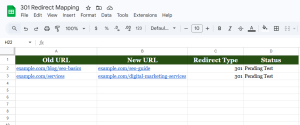
Every old URL should point to a relevant new page through a 301 redirect.
What technical SEO settings must be preserved during a redesign?
Several technical SEO settings must remain intact during a website redesign to ensure search engines can crawl and index the new version correctly.
| SEO Tasks | Key Objective |
|---|---|
| Create a URL mapping spreadsheet for old and new URLs | Prepare the redirect strategy |
| Implement 301 redirects from old URLs to new URLs | Transfer link equity and preserve rankings |
| Migrate page titles, meta descriptions, and header tags | Protect keyword relevance |
| Ensure internal links point to the correct new URLs | Avoid broken internal links |
| Recreate structured data using Schema.org | Preserve rich results and search visibility |
| Optimize page speed and Core Web Vitals | Improve user experience and ranking signals |
| Generate a new XML sitemap for the updated site | Help search engines crawl the new structure |
preserving technical SEO elements ensures search engines understand the redesigned site quickly.
How do you protect existing content and keyword rankings?
Protecting content during a redesign means ensuring that high-performing pages remain accessible and optimized for their target keywords.
Important steps include:
• Preserve top performing pages
• Keep URLs for pages generating organic traffic if possible
• Maintain metadata such as titles and descriptions
• Protect internal links
• Keep structured data from Schema.org
Example priority pages include:
• Top traffic blog posts
• Service pages ranking on page one
• High-authority landing pages
• Pages with strong backlinks
Do not remove or rewrite content that already performs well unless necessary.
How should performance and Core Web Vitals be optimized?
Performance optimization is critical because page speed and user experience are ranking signals in Google’s Core Web Vitals framework.
Core Web Vitals measure three main factors:
• Metric
• What It Measures
• Largest Contentful Paint (LCP)
• Page loading speed
• First Input Delay (FID)
• Interactivity
• Cumulative Layout Shift (CLS)
• Visual stability
Optimization techniques include:
• Compressing images
• Using browser caching
• Minifying CSS and JavaScript
• Using a CDN such as Cloudflare
• Optimizing server response times
Tools for testing performance include:
• Google PageSpeed Insights
• Lighthouse
• Chrome DevTools
Faster websites improve both rankings and user engagement.
What should you monitor immediately after launch?
Monitoring SEO performance after launch helps identify issues before they impact rankings.
| SEO Tasks | Key Objective |
|---|---|
| Submit the updated XML sitemap in Google Search Console | Ensure search engines discover new pages |
| Check Google Search Console for crawl errors | Identify indexing and redirect issues quickly |
| Test all 301 redirects and check for redirect chains | Ensure correct page migration |
| Monitor keyword rankings and organic traffic | Detect any ranking drops early |
| Fix broken links and missing pages | Improve crawlability and user experience |
| Track Core Web Vitals and page performance metrics | Ensure performance improvements remain stable |
Recommended monitoring schedule
• Daily checks during the first week
• Weekly checks for the first month
• Monthly monitoring afterward
Early detection of indexing issues can prevent long-term ranking loss.
Implementation Checklist
Pre-Redesign Planning
• Perform full SEO audit
• Export all existing URLs
• Identify top ranking pages
• Document backlinks and internal links
Migration Preparation
• Create URL mapping spreadsheet
• Implement 301 redirect plan
• Transfer metadata and structured data
• Update internal links
Technical Setup
• Generate new XML sitemap
• Review robots.txt rules
• Verify HTTPS and mobile friendliness
• Optimize Core Web Vitals
Post-Launch Monitoring
• Submit sitemap in Google Search Console
• Check crawl errors daily
• Monitor keyword rankings
• Analyze organic traffic trends
Conclusion
A website redesign does not have to damage SEO rankings. The key is treating the redesign as a structured migration rather than a simple visual update. By auditing the existing site, mapping redirects, preserving metadata, and monitoring performance after launch, businesses can protect organic traffic and maintain keyword visibility.
Netstager is a leading digital marketing agency in Dubai and one of the most trusted web design and digital marketing companies in India, offering SEO, Google Ads, social media marketing, web design, mobile apps, branding, and software development to help businesses build a powerful and results-driven online presence. Whether you’re looking for creative digital strategies, performance-focused marketing, or technology-driven web solutions, our teams deliver end-to-end services that help brands grow and connect effectively with their audience. For more details, visit our UAE and India websites for support. To learn more, visit www.netstager.ae or call +971 55 571 0078.