

If your website traffic is slowly declining without any major Google update, chances are you are dealing with content decay.
Content that once ranked well can lose visibility over time due to outdated information, stronger competition, or shifting search intent. This is not a sudden drop, it is a gradual decline that quietly impacts your organic growth.
Search engines like Google constantly update their rankings to prioritize fresh, relevant, and high-quality content. If your pages do not evolve, they get replaced.
Contents
- 1 What Is Content Decay?
- 2 Understanding the Content Lifecycle
- 3 Why Content Decay Happens
- 4 How to Identify Content Decay
- 4.1 Step 1: Audit Your Entire Content Library
- 4.2 Step 2: Check Google Search Console for Traffic Drops
- 4.3 Step 3: Track Keyword Ranking History
- 4.4 Step 4: Analyse Engagement Metrics in Google Analytics
- 4.5 Step 5: Compare Your Page Against Current Top Rankings
- 4.6 Step 6: Scan for Outdated Information
- 4.7 Step 7: Monitor Backlink Losses
- 5 Content Decay vs Algorithm Update
- 6 How to Fix Content Decay
- 7 How to Prevent Content Decay Before It Starts
What Is Content Decay?
Content decay refers to the gradual decline in organic traffic, rankings, or engagement of a webpage over time.
Unlike sudden drops caused by algorithm updates, content decay happens slowly and is often overlooked until traffic significantly drops.
For example, a blog that ranked on page 1 last year may now be on page 2 or 3, resulting in a steady loss of clicks and visibility.
Understanding the Content Lifecycle
Think of every piece of content as going through a lifecycle rather than staying static after publishing.
Most articles tend to follow a similar pattern over time:
- Initial traction:
Once published, the content gets indexed and begins appearing in search results. At this stage, traffic is low, but you may start seeing early signs of visibility through impressions, clicks, or a few backlinks. - Growth phase:
As the content gains relevance and authority, rankings improve. Organic traffic starts increasing steadily, and the page begins attracting a more consistent flow of visitors. - Peak performance:
This is when the content reaches its highest visibility. It ranks for key target keywords, drives strong traffic, and performs at its best in terms of engagement. - Stability with hidden decline:
Traffic may appear stable, but small ranking drops begin to occur. Competitors start publishing updated or more comprehensive content, and your page slowly loses its edge. - Decline stage:
Over time, newer and more relevant content overtakes your rankings. Visibility drops, traffic decreases, and the page no longer performs as it once did
A typical content decay pattern includes:
- Gradual drop in impressions
- Declining keyword rankings
- Reduced click-through rates
- Lower engagement metrics
The key difference is that the decline is progressive, not sudden.
Why Content Decay Happens
Content decay is not caused by a single factor. It is usually a combination of evolving search behavior and increasing competition.
1. Outdated Content
Information naturally becomes less relevant over time:
- Statistics become outdated
- Tools and technologies change
- Industry trends continue to evolve
Search engines, especially Google, often apply a concept known as Query Deserves Freshness (QDF). This means that for certain topics, newer and recently updated content is more likely to rank higher because users expect up-to-date information.
If your content is not refreshed regularly, it can lose rankings to more current and relevant pages, even if it was once performing well.
2. Increased Competition
As more content is published, the competition within the SERP naturally intensifies.
- Competitors create more in-depth and better-optimized content, often targeting the same keywords with stronger on-page SEO
- Articles become more comprehensive, covering broader topic clusters and related subtopics (topical authority)
- New formats such as video content, featured snippets, and AI-generated summaries start dominating visibility
Search engines aim to rank the most helpful and complete result, so if competing pages offer better content depth, UX, and relevance, your rankings can gradually decline.
This is often referred to as content saturation or SERP competition growth, where staying static means falling behind.
3. Search Intent Shift
Search intent is not fixed, it evolves as user behavior and expectations change over time.
- Informational queries may shift toward commercial or transactional intent as users become more decision-focused
- Users increasingly expect quick, direct answers, leading to the rise of featured snippets, FAQs, and AI-generated results
- SERP layouts evolve with elements like People Also Ask, video carousels, and AI overviews, changing how users interact with results
If your content no longer aligns with the current intent behind the query, it may lose relevance even if the keyword remains the same.
This is known as intent drift or search intent evolution, a major factor in content decay.
4. Declining Backlinks or Authority
Backlinks remain one of the strongest ranking signals, but their impact can change over time.
- Your page may lose backlinks due to link rot (pages being removed or updated)
- Competitors may gain higher-quality or more relevant backlinks, strengthening their authority
- Your domain may lag in overall authority growth compared to competitors
Search engines evaluate both link quality and freshness, so if your link profile weakens while others improve, your rankings can drop.
This is often tied to concepts like link equity loss, domain authority competition, and backlink freshness, all of which influence long-term ranking stability.
How to Identify Content Decay
Step 1: Audit Your Entire Content Library
Get a full list of every page on your site and its current status.
How to do it:
- Crawl your site using Screaming Frog or Sitebulb
- Export all live URLs with publish date and last updated date
- Remove non-SEO pages, thank you pages, login pages, and privacy policy
- Sort by oldest publish date first; these carry the highest decay risk
What to look for:
- Pages published 2+ years ago with no updates
- Pages that were once top performers but have not been touched since
- Blog posts referencing outdated years, tools, or statistics
Step 2: Check Google Search Console for Traffic Drops
Identify pages that are losing clicks and impressions in Google search.
How to do it:
- Open Google Search Console
- Go to Performance → Search Results
- Set the date range to last 16 months
- Click the Pages tab
- Sort by clicks and compare the current period vs. the previous year
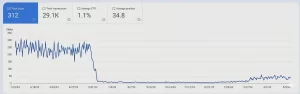
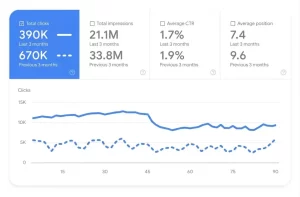
Decay signals to flag:
- Pages losing 20% or more traffic year over year
- Impressions falling while position stays the same, keyword demand is shrinking
- Position dropping while impressions stay flat, competitors are outranking you
- CTR declining, your title and meta description are no longer compelling
Quick tip: Export this data to a spreadsheet and color-code pages — red for 20%+ drop, yellow for 10–20% drop, green for stable or growing.
Step 3: Track Keyword Ranking History
Identify keywords your page is losing ground on over time.
How to do it:
- Open Ahrefs or Semrush
- Enter your page URL in Site Explorer
- Go to Organic Keywords
- Filter for keywords previously ranking in positions 1–10
- Check the position history graph for each keyword
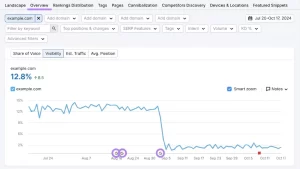
Decay signals to flag:
- Keywords drifting from position 3 to position 10+ over 6 months
- Keywords dropping off page 1 entirely
- Featured snippet lost to a competitor
- Long-tail keyword variations disappearing from rankings
What it tells you: If your primary keyword has drifted from position 4 to position 14 over 12 months without any algorithm penalty, content decay is almost certainly the cause.
Step 4: Analyse Engagement Metrics in Google Analytics
Understand how user behaviour on your page has changed over time.
How to do it:
- Open Google Analytics 4
- Go to Reports → Engagement → Pages and Screens
- Filter by organic traffic only
- Compare the current 6 months vs. the same period last year
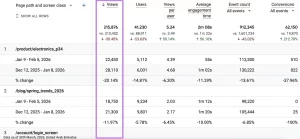
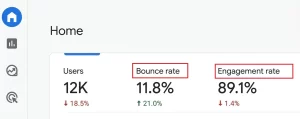
Decay signals to flag:
- Bounce rate is increasing, and users are leaving faster than before
- Average engagement time is decreasing, and content feels less relevant
- Scroll depth declining, users are reading less of the page
- Conversion rate dropping, page is no longer persuasive or relevant
What it tells you: Declining engagement signals tell Google that users are not finding your page satisfying, which accelerates ranking drops over time.
Step 5: Compare Your Page Against Current Top Rankings
Find the gap between your content and what Google currently considers the best answer.
How to do it:
- Search your target keyword in an incognito browser
- Open the top 3–5 ranking pages
- Read them carefully and compare them against your own page
Ask yourself:
- Is their content longer and more detailed than mine?
- Do they cover topics or subtopics that my page completely misses?
- Are their statistics and examples more recent?
- Do they have better visuals, tables, infographics, videos?
- Do they answer questions my page ignores?
- Is their page structure easier to navigate?
What it tells you: If competitors are consistently outperforming you across these factors, your content has decayed relative to what Google now expects for that keyword.
Step 6: Scan for Outdated Information
Identify specific content elements that have become stale or inaccurate.
What to scan for:
- Statistics citing years that are 2+ years old
- References to tools or platforms that have significantly changed
- Outdated screenshots of software interfaces
- Pricing information that is no longer accurate
- Laws, regulations, or policies that have since been updated
- Broken or redirected outbound links
- References to events or trends that are no longer relevant
How to check broken links:
- Use Screaming Frog or Ahrefs broken link checker
- Flag all outbound links returning 404 errors or permanent redirects
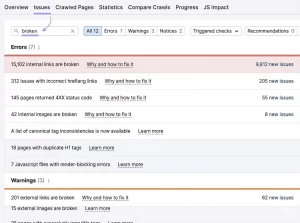
What it tells you: Outdated content erodes trust with both users and Google , especially on topics where accuracy and recency directly affect the quality of the information.
Step 7: Monitor Backlink Losses
Goal: Identify pages that are losing the authority they once had.
How to do it:
- Open Ahrefs → Site Explorer → enter your page URL
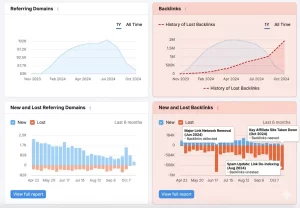
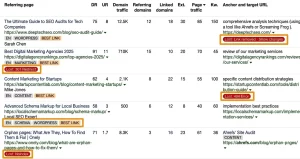
- Go to Backlinks → switch to the Lost tab
- Check the Referring Domains graph over the past 12 months
- Flag pages that have lost 10% or more of their referring domains
Decay signals to flag:
- Steady decline in referring domains over 6–12 months
- High-authority backlinks removed or redirected away
- Pages that earned strong links 2–3 years ago but have not attracted new links since
What it tells you: Backlink loss reduces a page’s domain authority signal — directly contributing to ranking drops. Pages losing both traffic and backlinks simultaneously are the highest priority for a content refresh.
Content Decay vs Algorithm Update
Understanding this difference helps you respond correctly.
How to Fix Content Decay
Fixing content decay is not about rewriting everything from scratch. It is about strategically improving what already exists so it aligns with current search expectations and competition.
1. Update and Refresh Content
Start by improving the freshness and relevance of your content.
- Replace outdated statistics with recent data
- Update tools, examples, and industry references
- Improve readability by simplifying structure and formatting
- Expand thin sections with more useful insights
Search engines, especially Google, prioritize content that reflects current information and accuracy, making freshness a key ranking signal.
2. Align with Current Search Intent
Over time, the intent behind a keyword can change, so it is important to reassess it.
- Analyze the current SERP for your target keyword
- Identify whether results are informational, commercial, or transactional
- Observe the content formats that are ranking, such as blogs, listicles, or landing pages
Once you understand the updated intent, adjust your content to match it. Even small misalignments can lead to ranking drops.
3. Improve Content Depth and Quality
Content that ranks today is expected to be comprehensive and valuable.
- Add relevant examples to improve clarity
- Include visuals to enhance engagement
- Cover missing subtopics to strengthen topical authority
Search engines reward content that provides complete and well-structured answers, not just surface-level information.
4. Optimize for Click-Through Rate (CTR)
Improving rankings alone is not enough, you also need users to click on your result.
- Rewrite your meta title and description to make them more compelling
- Use clear and benefit-driven language instead of generic wording
- Ensure your title accurately reflects the content
Even small improvements in CTR can significantly increase traffic without changing rankings.
5. Strengthen Internal Linking
Internal links help search engines understand your site structure and pass authority.
- Link to the page from high-authority or high-traffic pages
- Use descriptive anchor text that reflects the topic
- Ensure links are placed naturally within relevant content
Strong internal linking improves crawlability, indexing, and page authority, all of which support better rankings.
When combined, these steps help restore lost rankings and extend the lifespan of your content without needing to start from scratch.
How to Prevent Content Decay Before It Starts
Fixing content after traffic drops is reactive. A stronger approach is to build a simple system that keeps your content updated and competitive over time.
Instead of treating content as a one-time task, think of it as something that needs regular maintenance to sustain performance.
Build a Content Refresh Cycle
Not all pages need the same level of attention. Prioritize updates based on performance and business impact.
Pages that drive the most traffic or conversions should always be updated more frequently, as even small declines can impact overall performance.
Use a Simple Content Audit Framework
Before updating any page, ask a few key questions to identify what needs improvement:
- Is the information still accurate and up to date?
- Has the search intent for this topic changed?
- Are competitors offering more value or better content?
- Does this page still contribute to conversions or business goals?
These questions help you focus on high-impact updates instead of unnecessary rewrites.
By following a structured refresh process, you can extend the lifespan of your content, maintain rankings, and prevent sudden traffic drops.
Content decay is not a one-time issue, it is an ongoing reality in SEO. As search trends evolve, competitors improve, and user expectations shift, even your best-performing content can lose visibility over time.
The key is not just to create new content, but to continuously refine and align existing content with current search intent, relevance, and quality standards. Businesses that treat content as a long-term asset, rather than a one-time effort, are the ones that sustain rankings and traffic.
If your traffic is declining without a clear reason, content decay is often the hidden cause. Instead of constantly chasing new content, focus on improving what already exists. As your digital growth partner, Netstager helps you identify, optimize, and scale high-performing content for sustainable SEO growth.